AIS vs Form 26AS: What’s the Difference? A Simple Guide for Taxpayers in 2026
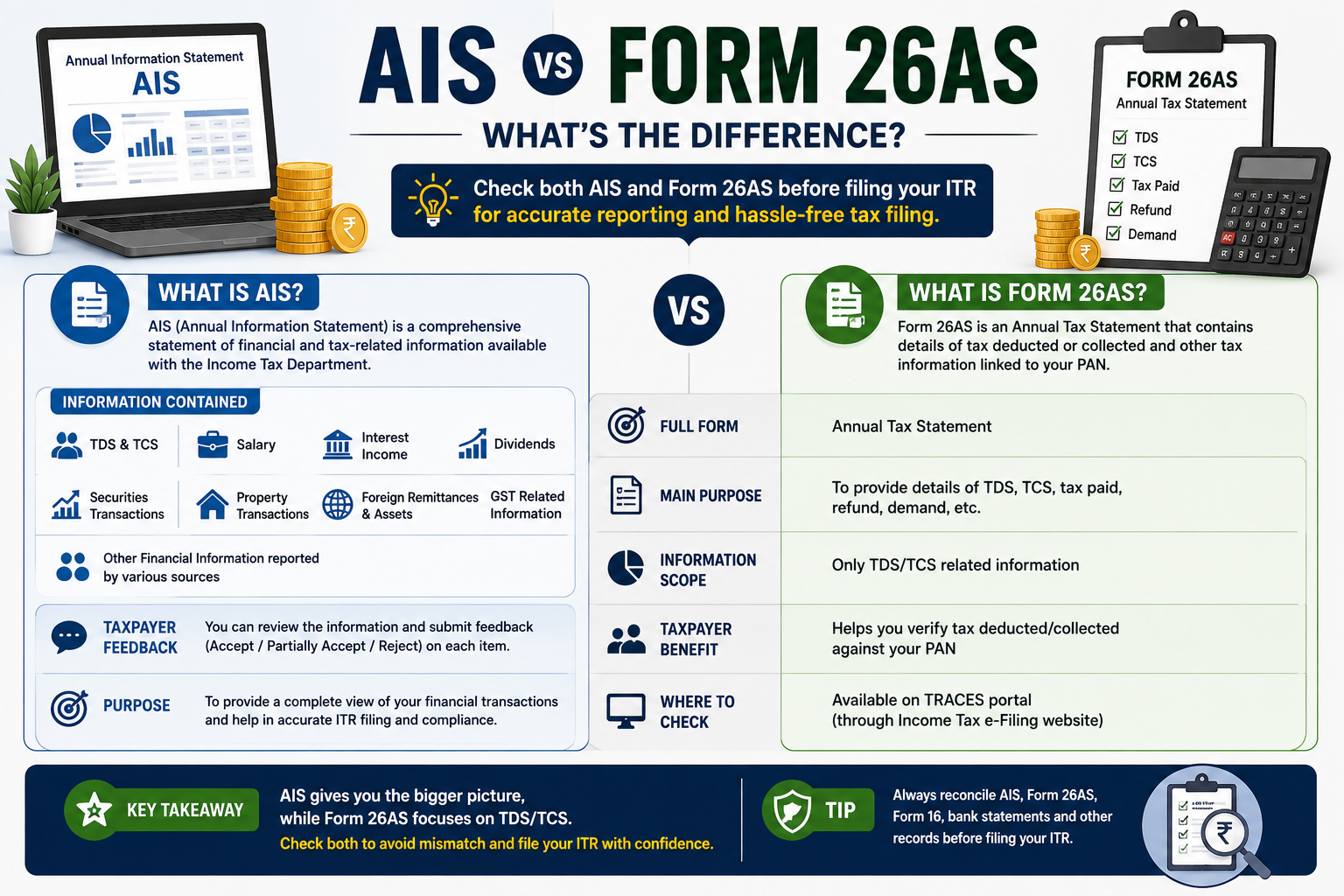
AIS vs Form 26AS: What’s the Difference?
If you’re filing your Income Tax Return in India, you’ve probably heard about AIS and Form 26AS.
But what exactly are they?
Are AIS and Form 26AS the same thing?
If they’re different, which one should you check before filing your ITR?
These are common questions, especially for first-time taxpayers.
The short answer is:
Form 26AS mainly shows your TDS and TCS-related tax information, while AIS provides a much broader view of financial and tax-related information available to the Income Tax Department.
Since Assessment Year (AY) 2023–24 onward, Form 26AS available through TRACES displays only TDS/TCS-related data, while other taxpayer information is available through AIS. The Income Tax Department also allows taxpayers to provide feedback on information reported in AIS.
Understanding the difference between the two can help you spot discrepancies before filing your ITR.
Let’s break it down.
What Is AIS?
AIS stands for Annual Information Statement.
It is a comprehensive statement that provides taxpayers with information available to the Income Tax Department.
The purpose of AIS is to give taxpayers a broader picture of the information reported against their PAN before they file their income tax return.
According to the Income Tax Department, AIS is designed to:
- Display information available to the taxpayer before filing an income tax return
- Allow taxpayers to provide online feedback
- Support pre-filling of returns
- Encourage voluntary tax compliance
In simple words:
AIS is like a broader financial information report connected to your tax records.
It can contain information from different reporting sources, not just your employer.
What Is Form 26AS?
Form 26AS is an Annual Tax Statement.
It is primarily useful for checking your TDS and TCS-related information.
For example, if your employer deducted TDS from your salary, that tax deduction can appear in Form 26AS.
Similarly, TDS/TCS information reported against your PAN can be reflected there.
The Income Tax Department states that from AY 2023–24 onward, Form 26AS available through TRACES displays only TDS/TCS-related data. Other information is available in AIS.
So, if you’re checking whether the tax deducted from your income has been properly reported, Form 26AS remains important.
AIS vs Form 26AS: Quick Comparison
| Feature | AIS | Form 26AS |
|---|---|---|
| Full Name | Annual Information Statement | Annual Tax Statement |
| Main Purpose | Broader taxpayer information | TDS/TCS tax information |
| TDS Information | Yes | Yes |
| TCS Information | Yes | Yes |
| Wider Financial Information | Yes | No |
| Taxpayer Feedback | Yes | No comparable AIS feedback facility |
| Used Before ITR Filing | Yes | Yes |
| Available Online | Yes | Yes |
| Main Focus | Comprehensive tax/financial information | Tax deducted/collected |
The Income Tax Department specifically distinguishes the two this way: 26AS focuses on TDS/TCS, while AIS contains other taxpayer information as well.
What Information Can You Find in AIS?
AIS can contain information from multiple categories.
Depending on your circumstances and information reported by different sources, it may include details related to:
- TDS
- TCS
- Salary
- Interest
- Dividends
- Securities transactions
- Property-related transactions
- Certain foreign remittances
- GST-related information
- Other reported financial information
The exact information available can vary from taxpayer to taxpayer.
The Income Tax Department explains that AIS can display information such as the category, information source, description and amounts reported, processed or accepted by the taxpayer.
This is why AIS can be particularly useful when you’re preparing your ITR.
What Information Does Form 26AS Show?
Form 26AS is more focused.
Its key purpose is to show TDS and TCS information associated with your PAN.
For example, if you are a salaried employee and your employer deducts ₹50,000 as TDS during the year, you can use Form 26AS to check whether that tax deduction has been reflected.
This is important because your tax return should generally be consistent with the tax information reported against your PAN.
Why Should You Check AIS Before Filing Your ITR?
This is one of the most important steps for taxpayers.
Imagine you earned:
₹8 lakh salary
and received:
₹20,000 bank interest
You might remember your salary but accidentally forget the interest.
If the interest is reported in AIS, reviewing your AIS can remind you to consider whether it needs to be included in your tax return.
Similarly, AIS may show investment or transaction-related information that you may need to examine before filing.
This doesn’t mean that every transaction displayed in AIS is automatically taxable income.
That’s an important distinction.
AIS is a source of information. You still need to determine the correct tax treatment based on your circumstances and applicable tax rules.
Why Should You Check Form 26AS?
Form 26AS is particularly useful for checking your TDS and TCS information.
For example, suppose your employer deducted:
₹75,000 TDS
from your salary during the year.
Before filing your ITR, you should check whether the relevant tax credit has been reported correctly.
If your records and Form 26AS don’t match, you may need to investigate the issue with the deductor or through the applicable tax process.
This can help reduce the chances of problems during ITR processing.
AIS vs 26AS: Which One Is More Important?
The answer is:
Both are important, but they serve different purposes.
Think of it this way:
Form 26AS
Think:
“How much TDS/TCS has been reported against my PAN?”
AIS
Think:
“What financial and tax-related information has been reported about me?”
For a more complete ITR preparation process, checking both is a sensible approach.
How to Check Your AIS Online
You can access AIS through the Income Tax e-Filing portal.
According to the Income Tax Department, the basic process is:
Step 1: Visit the Income Tax e-Filing Portal
Go to the official Income Tax Department e-Filing website.
Step 2: Log In
Use your registered credentials to access your account.
Step 3: Open AIS
After logging in, access the Annual Information Statement (AIS) option.
Step 4: Open the AIS Portal
Follow the instructions to proceed to the AIS functionality.
Step 5: Select the Relevant Financial Year
Choose the financial year you want to review.
Step 6: Review the Information
Go through the different categories and transactions reported.
The Income Tax Department currently instructs taxpayers to access AIS through the e-File/AIS menu after logging in.
How to Check Form 26AS
Form 26AS can also be accessed through the Income Tax e-Filing ecosystem.
The Income Tax Department’s current guidance identifies Form 26AS as available through the e-Filing portal via the relevant View Form 26AS option, with the statement itself available through TRACES.
Once you access it, review the TDS/TCS information associated with your PAN.
What Is TIS?
While looking at AIS, you may also come across another term:
TIS — Taxpayer Information Summary.
TIS provides an aggregated view of information at the information-source level.
The Income Tax Department states that information accepted by the taxpayer or confirmed by the source in TIS can be used for pre-filling the return, where applicable.
In simple terms:
AIS = detailed information
TIS = summarized information
This can make it easier to understand the bigger picture before filing your return.
What If You Find an Incorrect Transaction in AIS?
Don’t panic.
One of the useful features of AIS is that taxpayers can provide feedback on reported information.
For example, suppose AIS shows a transaction that you don’t recognize or believe is incorrect.
You can review the information and use the feedback functionality available in AIS where applicable.
The Income Tax Department specifically states that AIS provides taxpayers with the option to submit feedback on transactions reported to them.
However, you shouldn’t simply ignore an unfamiliar entry.
First, try to understand where it came from and whether it actually relates to you.
Does AIS Mean You Have to Pay Tax on Everything Shown There?
No.
This is one of the biggest misconceptions about AIS.
AIS is a statement of information reported to the tax department.
The presence of a transaction in AIS doesn’t automatically mean that the entire amount is taxable income.
For example, a transaction could represent:
- A purchase rather than income
- A sale transaction
- A gross amount rather than taxable profit
- A duplicate or incorrect report
- A transaction that requires further tax treatment
The actual taxability depends on the nature of the transaction and the applicable tax rules.
Therefore, don’t simply add every AIS figure together and treat it as taxable income.
What If AIS and Your Records Don’t Match?
This can happen.
For example, AIS may show a transaction that you don’t recognize, or the amount may differ from your own records.
If you find a mismatch:
1. Don’t ignore it
Review the transaction carefully.
2. Check your own records
Look at your bank statements, investment statements, salary records or other relevant documents.
3. Identify the reporting source
AIS provides information about the source of the reported information.
4. Check whether the transaction is actually yours
Sometimes a transaction may have been reported incorrectly.
5. Submit feedback where appropriate
AIS provides a facility for taxpayers to provide feedback on reported information.
6. Don’t blindly change your ITR
First understand the transaction and its tax treatment.
If you’re dealing with a complicated discrepancy, professional tax advice may be appropriate.
AIS vs Form 26AS: Example
Let’s understand this with a simple example.
Suppose Rahul is a salaried employee.
During the year:
- Salary: ₹10 lakh
- TDS deducted by employer: ₹60,000
- Savings account interest: ₹12,000
- FD interest: ₹25,000
- Mutual fund transactions: Yes
Rahul should not look only at his Form 26AS.
Form 26AS
He can use it primarily to check his reported TDS/TCS information.
AIS
He can review broader information, including relevant interest, investment and transaction information reported to the tax department.
This gives Rahul a better opportunity to identify information that may need attention before filing his ITR.
7 Mistakes to Avoid When Checking AIS and 26AS
1. Checking Only Form 26AS
Many taxpayers still think 26AS contains every financial transaction.
It doesn’t.
From AY 2023–24 onward, its scope is primarily TDS/TCS.
2. Ignoring AIS
AIS can contain broader information relevant to your tax return.
3. Assuming Every AIS Entry Is Taxable
An AIS transaction is not automatically equivalent to taxable income.
4. Not Checking TDS
If your TDS information is incorrect or missing, it can create problems during tax filing.
5. Checking AIS Only on Filing Day
Don’t wait until the last moment.
Give yourself time to investigate discrepancies.
6. Ignoring Unknown Transactions
An unfamiliar entry deserves attention.
7. Blindly Copying AIS Into Your ITR
AIS is a useful source of information, but your ITR should reflect the correct income and tax treatment applicable to your circumstances.
AIS and 26AS Checklist Before Filing Your ITR
Before submitting your tax return, consider checking:
- Form 26AS
- AIS
- TDS information
- TCS information, if applicable
- Salary/Form 16
- Bank interest
- FD interest
- Dividend income
- Capital gains
- Investment transactions
- Other reported income
- Bank statements
- Any unfamiliar AIS transactions
- Tax payments
- Applicable deductions
This simple checklist can help you catch issues before submitting your return.
Frequently Asked Questions
Is AIS the same as Form 26AS?
No.
From AY 2023–24 onward, Form 26AS available through TRACES displays TDS/TCS-related information, while AIS provides broader information about the taxpayer.
Which is better, AIS or 26AS?
Neither is a replacement for the other.
AIS provides broader information, while Form 26AS is particularly useful for checking TDS/TCS.
For ITR preparation, reviewing both is recommended.
Is AIS mandatory for ITR filing?
AIS is not a separate ITR filing requirement. However, reviewing it before filing can help you identify information reported to the tax department.
Does AIS show salary?
Salary-related information can be available in AIS depending on the information reported by the relevant source.
Does AIS show bank interest?
Relevant interest information can be reported in AIS depending on the information received by the tax department.
What should I do if AIS has wrong information?
Review the entry, identify the source and provide feedback through the AIS facility where appropriate.
Can AIS help with ITR pre-filling?
Yes. The Income Tax Department states that information accepted by the taxpayer or confirmed by the source in TIS can be used for pre-filling of the return, where applicable.
Final Thoughts
Understanding AIS vs Form 26AS is becoming increasingly important for anyone filing an Income Tax Return.
The simplest way to remember the difference is:
Form 26AS = primarily TDS and TCS information
AIS = broader taxpayer information
Don’t rely on just one statement when preparing your ITR.
Before filing, check your AIS, Form 26AS, Form 16, bank statements, investment records and other relevant documents.
If you find a mismatch, investigate it instead of ignoring it. And if AIS contains information that you believe is incorrect, use the feedback facility provided by the Income Tax Department where applicable.
Good tax planning isn’t about filing your return as quickly as possible. It’s about filing it accurately.
Taking a little extra time to review your tax information can help you avoid unnecessary confusion later.
Disclaimer: This article is for general educational and informational purposes only and does not constitute tax, legal, financial or investment advice. Tax rules, reporting systems and filing procedures can change. Always verify the latest information on the official Income Tax Department portal or consult a qualified tax professional for advice based on your individual circumstances.